
 Add to Chrome
Inspect Font
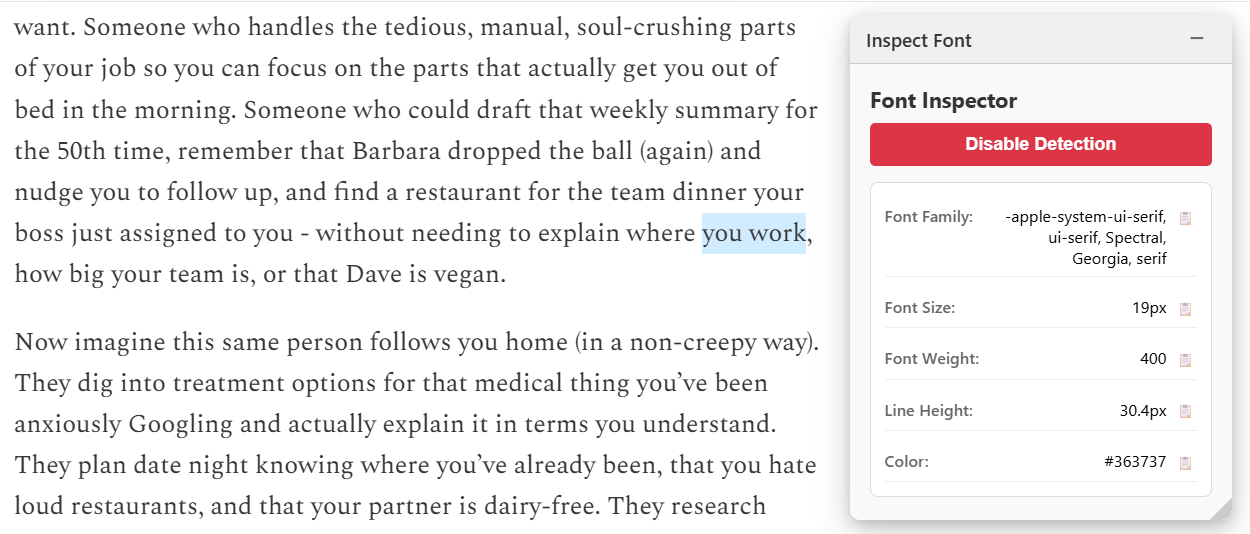
A font detection tool that captures and displays CSS font properties from selected text on the page.
Extension
What This Does
This applet provides a powerful yet simple way to inspect and capture font properties from any text on a webpage. Simply select text and instantly see all its CSS font styling details in a clean, organized interface.
How to Use
- Click the "Add to Shaper" button to add this applet to your browser. (Make sure you have Shaper downloaded before.)
- Select any text on any page.
- The Inspect Font widget will display all the font properties.
- Click the copy button next to any property to copy it to your clipboard.
Use Cases
- Design Replication: Identify and copy font styles from websites you admire
- Typography Documentation: Quickly document font specifications for design systems
- Web Development: Match exact font properties when implementing designs
- Quality Assurance: Verify that fonts render correctly across different pages
- Design Inspiration: Collect font combinations and styles from around the web
- Client Work: Extract font details from existing websites for redesign projects